HangarGrid is live, and I'm inviting my first 50 Founding Pilots
HangarGrid, a digital passport for every RC aircraft, is now live. Before it opens to the wider RC community, I'm personally inviting pilots I know and trust to be its first 50 Founding Pilots. Here's the story, exactly how the program works, and what I'm asking of you.
I have some news I've been waiting a long time to share: HangarGrid is live.
If you haven't heard of it, that's because you're among the very first to know. I haven't announced it on any group, forum or page. Before I do, I want to do something more personal: bring in the right people first, one pilot at a time.
This post explains what HangarGrid is, why I'm starting small, and how you can be one of the 50 pilots who shape it. It's a long one, because I want you to have everything you need in one place. Grab a chai.
If a pilot sent you here with a personal invite, you'll find it right at the top of this page, and again further down whenever you're ready.
Where this all started
I love this hobby. The building, the tinkering, the early mornings at the field, the nervous minutes before a maiden. If you're reading this, I'm guessing you do too.
But for years, I was terrible at keeping track of it all.
Ask me how many flights my favourite aircraft had done, and I'd guess. Ask me when I last checked the control horns, and I'd go quiet. Battery cycles? Somewhere in a notebook. The servo I swapped last season? Somewhere in a WhatsApp chat. The engine settings that finally worked? In my head, until they weren't.
And I wasn't alone. Look around any field and you'll see the same thing. We put weeks into a build and lakhs into a fleet, and then keep the story of each aircraft in five different places, or nowhere at all.
HangarGrid is my answer to that.
What HangarGrid is
HangarGrid is a digital passport for every RC aircraft.
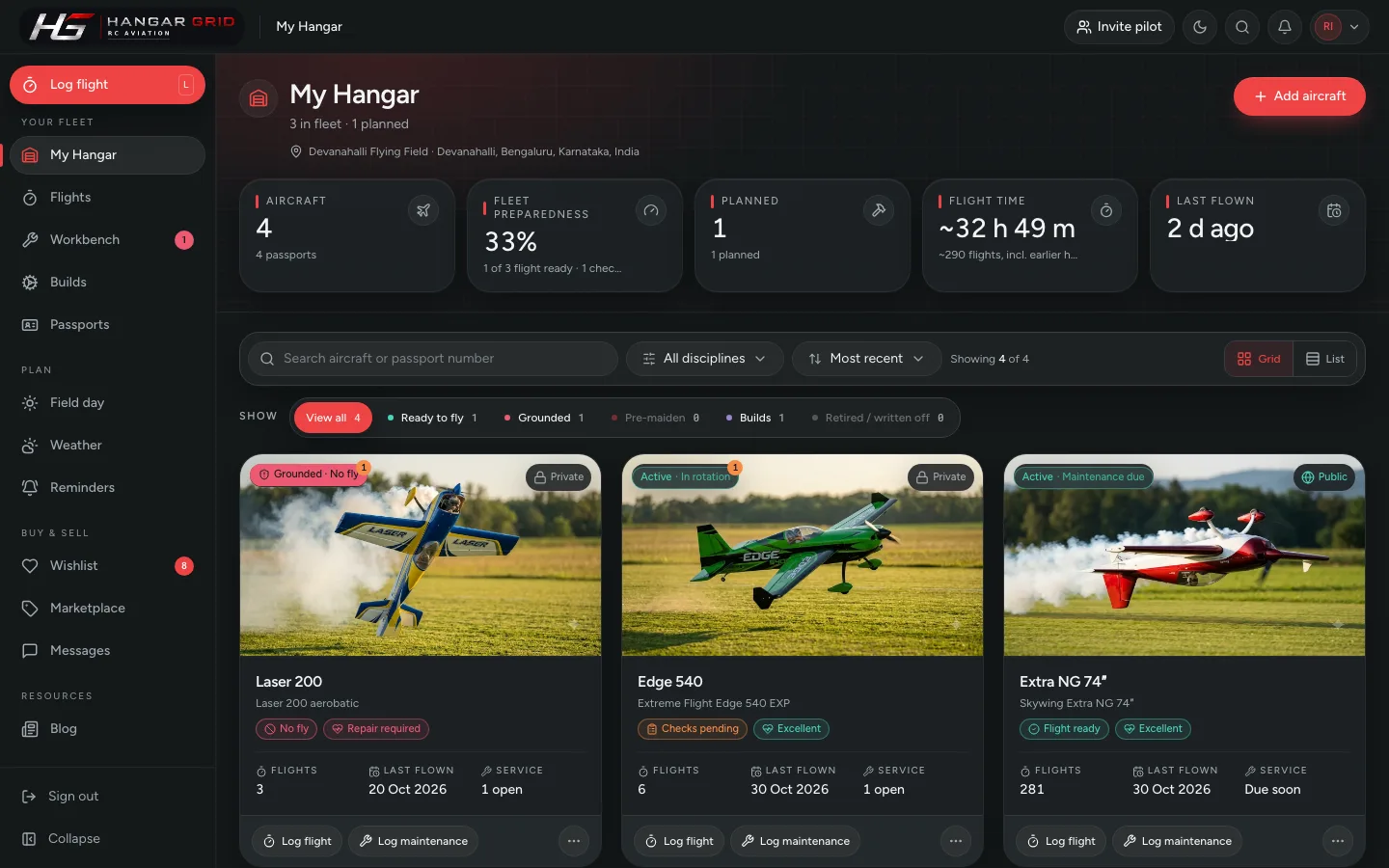
Every aircraft you own gets one, and the passport holds its whole life story: what it is, how it was built, every flight, every repair, every part that went in or came out, and whether it's ready to fly today. Think of the logbook a full-size aircraft carries, only easier, and made for the way we actually fly.
Around the passport sit the things we deal with every week:
A hangar for your whole fleet, added in a minute or two each, including the history of aircraft that have been flying for years.
Flight logging in seconds, so you get real numbers: total flights, total hours, and which aircraft you actually fly the most.
One clear safety status on every aircraft: Flight ready, Checks pending or No fly, always with the reason, so a known problem never gets quietly forgotten.
Build planning with weight and cost as you go, before you buy a single part.
Field days and weather for your own fields: wind, gusts, rain and air quality, and which packs to charge.
A marketplace where aircraft are sold with their passport attached, so a buyer sees real flights and real repairs, not just "flown gently, never crashed".
It's built by an RC pilot, for RC pilots, and everything is private until you choose to share it.
I've written the full story, with a screen-by-screen tour, in my first post. If you have ten minutes, read it before you sign up:
You don't maiden it over a crowd. You take it out on a calm morning with a couple of pilots you trust. You check the CG, you trim it, you listen to what the people around you noticed. Only when it flies right do you show it off.
That's where HangarGrid is right now. It's built, it flies, and I use it every week. But it was built by one pilot, with one pilot's habits and blind spots. Somewhere in it there are screens that will confuse you, things that are simply broken, and features you need that I haven't even thought of.
I'd much rather find all of that with 50 passionate pilots than with five thousand strangers. So before I open the doors, I'm inviting a small group to fly it first and tell me, honestly, what they see.
I'm calling them Founding Pilots.
What a Founding Pilot is
A Founding Pilot is one of the first 50 pilots on HangarGrid, brought in personally by someone who flies with them.
There are 50 spots, numbered in the order pilots earn them, and there will never be more.
Every spot comes through a personal invitation: from me, or from a Founding Pilot who knows you.
You earn your spot by actually using HangarGrid: adding an aircraft and logging a flight.
In return, you get a real say in what HangarGrid becomes.
Once the 50 spots are taken, the program closes for good. Pilots who join after that are every bit as welcome, but they join as regular pilots. The Founding Pilot badge belongs to the first 50 only.
What I'm asking of you
I want to be completely clear about the expectations, so there's no guessing.
1. Earn your spot in three steps. Sign up through your invite link, add an aircraft you actually fly with a photo, and log a flight. That's it. It takes about ten minutes, and I'll walk you through it with screenshots below.
2. Use it for real. Please add real aircraft and real flights. The whole point is real use and real feedback. A made-up aircraft might get you a number, but it won't help either of us.
3. Tell me what you think, honestly. This is the heart of the program. What works? What's confusing? What's broken? What's missing? Nothing is too small, and nothing will offend me.
4. Bring in up to three pilots you trust. Once you're a Founding Pilot, you get your own invite link for three pilot friends. Choose them the way I chose you: real flyers, passionate about the hobby, who'll give honest feedback.
What you get
A permanent, numbered Founding Pilot badge. It shows next to your name on your profile, your blog posts and your comments, and it stays there for good.
A direct line to me. Your feedback lands with me personally. When I've acted on something you raised, you'll get a note in your notifications and by email.
A first look at new features, and a real say in what gets built next.
Your own invite link, to bring three friends into the first 50.
How the first 50 come together
This is the part I'm most excited about.
I can only personally invite the pilots I know. But every pilot I invite knows pilots I've never met: from their club, their city, their field. When they become Founding Pilots, each of them can bring in three. And each of those can bring in three more.
So the first 50 come together the way this hobby always has: one trusted pilot introducing another. By the time the spots are full, they'll stretch across clubs, cities and flying styles I could never have reached on my own. That mix is exactly what HangarGrid needs to get right.
That's also why the limit is three each. It keeps the 50 spots spread across as many circles of pilots as possible, rather than one big group of friends.
Step by step: earning your spot
Step 1: Accept your invite and sign up
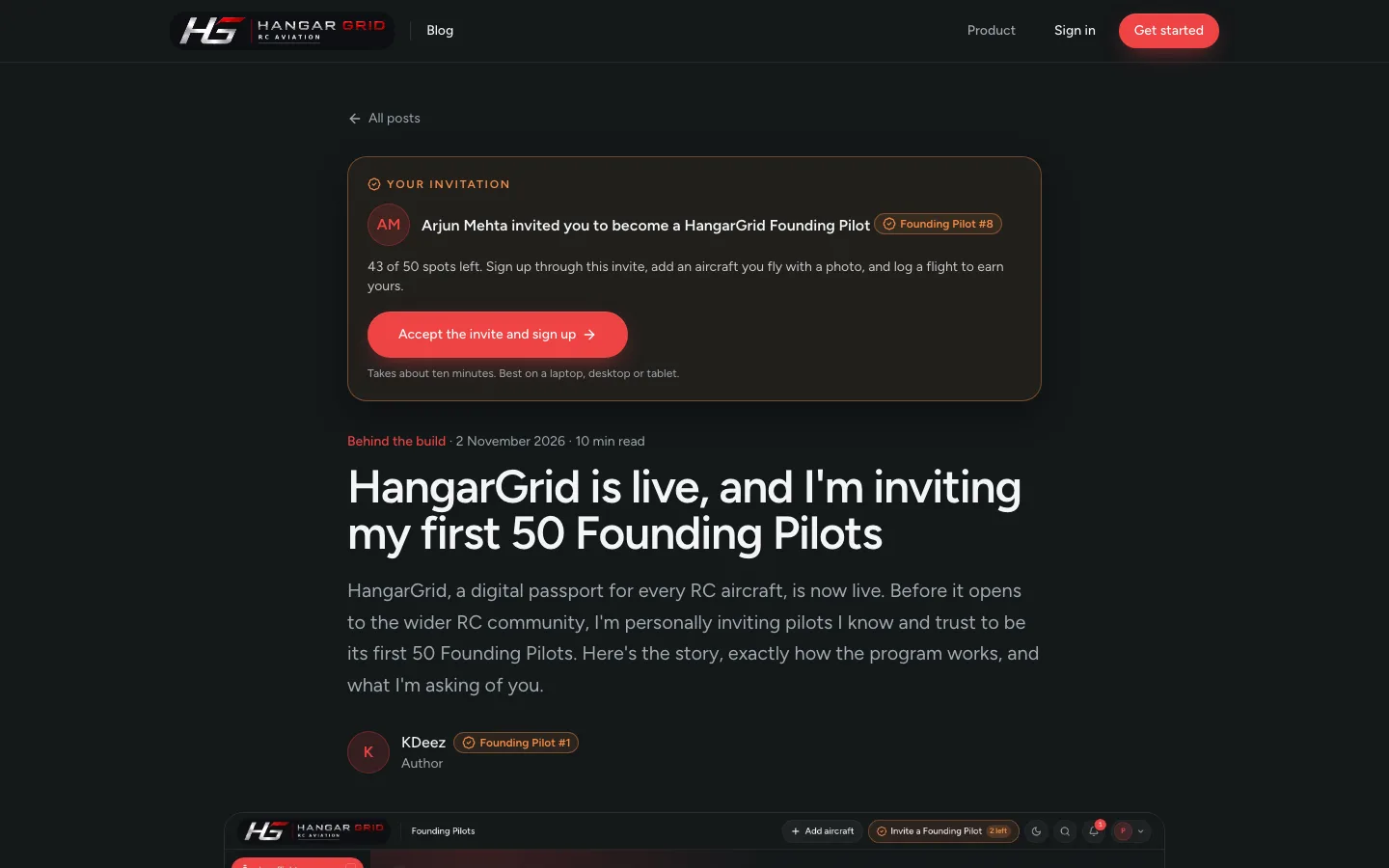
Your invitation is a personal link, from me or from a Founding Pilot who knows you. It opens this very post, with your invitation at the top: who invited you and how many of the 50 spots are left.
Your invitation: who it's from, how many spots are left, and the button to accept it.
Click Accept the invite and sign up, and create your account with Google or your email address. That's the first step done.
It has to be through that button. If you sign up any other way, HangarGrid can't tell who invited you, and it won't count towards a spot. If you've lost the link, just ask the pilot who sent it.
HangarGrid works best on a laptop, desktop or tablet. Phone apps will follow later.
Step 2: Add an aircraft and log a flight
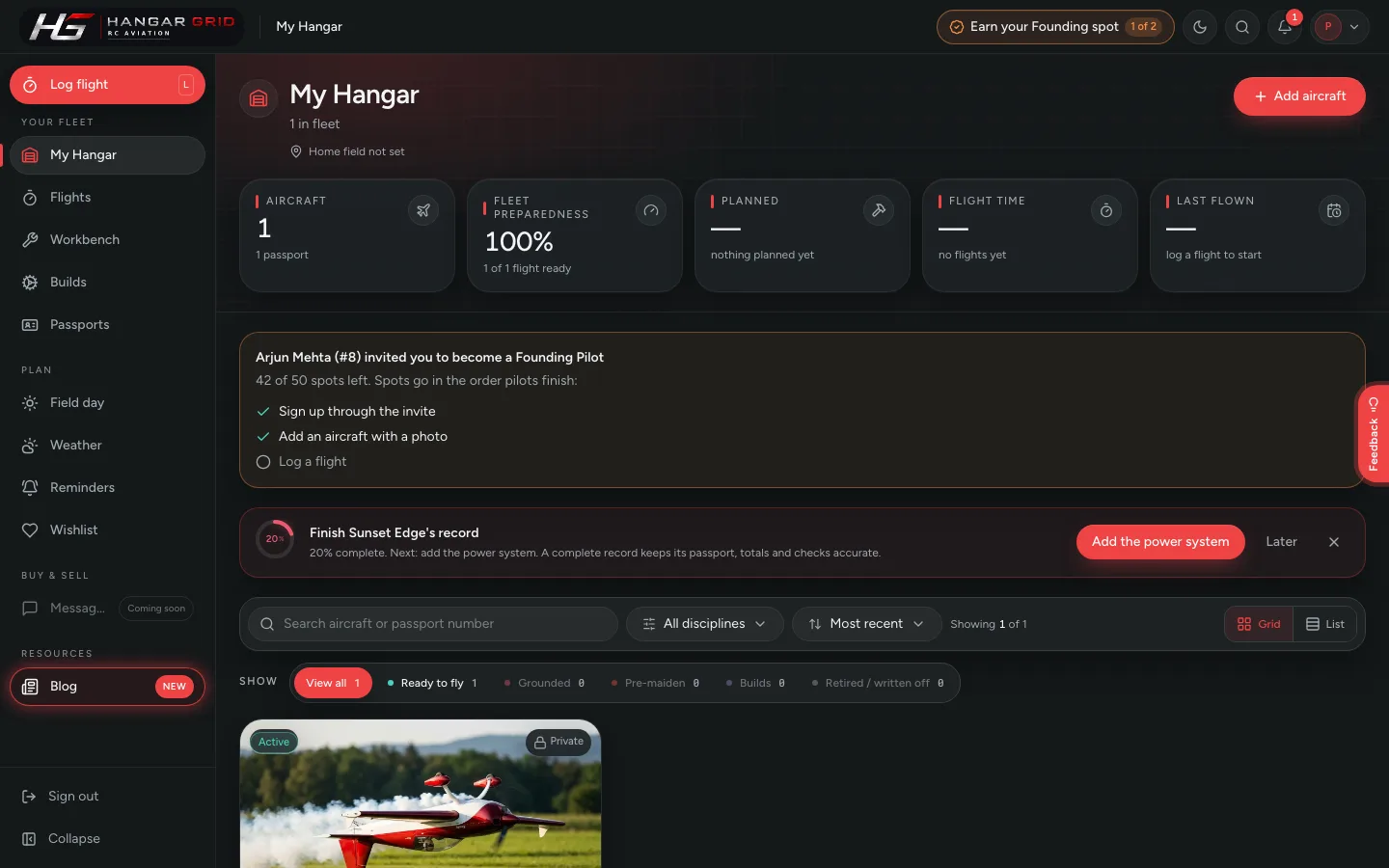
Once you're in, My Hangar shows your Founding Pilot checklist, with a tick next to each step as you finish it. At the top of every page, a gold Earn your Founding spot button shows how far you've got, so you never lose track.
Your checklist: what's done, what's left, and the gold button at the top showing your progress.
Add an aircraft: click Add an aircraft, choose the maker and model, and add a photo. If it has already flown, tell HangarGrid roughly how many flights and hours it has done, so its history comes along from day one.
Log a flight: open the aircraft and click Log flight, or use the red Log flight button at the top of the sidebar. Your next session at the field, or one you flew recently.
Spots go in the order pilots finish, so if you've received an invite, don't sit on it.
Step 3: Get your number and your link
The moment both steps are done, you get the next Founding Pilot number, automatically.
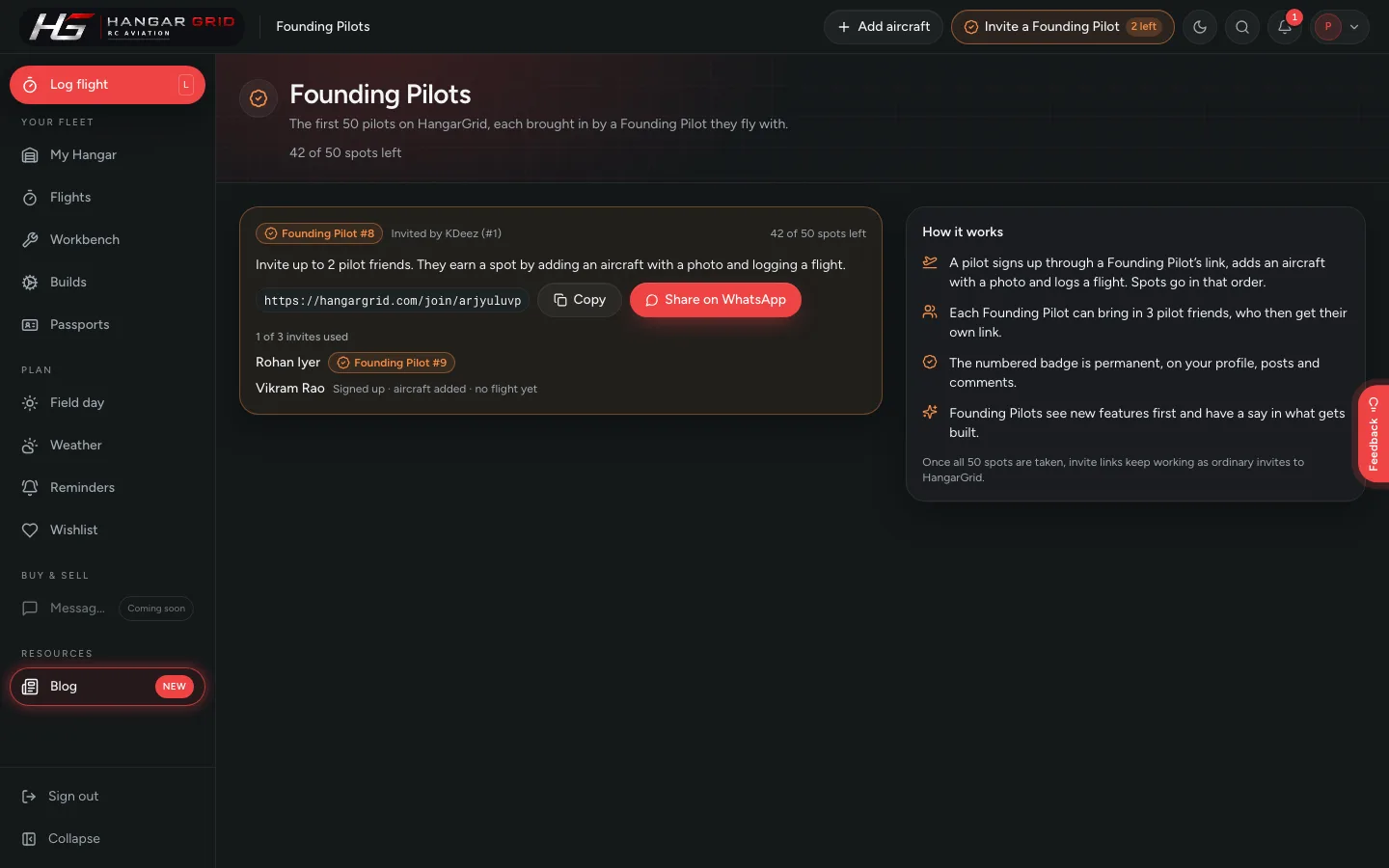
The gold button at the top changes to Invite a Founding Pilot. Click it to open your Founding Pilot page: your number, your personal invite link, and buttons to copy the link or share it straight to WhatsApp.
Your Founding Pilot page: your number, your invite link, and how each friend you invited is getting on.
Step 4: Invite your three
Send your link to the pilots you fly with, personally rather than to a big group. The same page shows how each of them is getting on: signed up, aircraft added, flight logged, and their number once they've earned it.
Your link opens this same post for them, with your invitation at the top, so they get the whole story and a clear way in, just like you did.
When your three are in, or when all 50 spots are taken, the gold button goes back to a normal Invite pilot. Your link keeps working. Anyone who joins through it simply joins HangarGrid as a regular pilot.
Giving feedback that helps
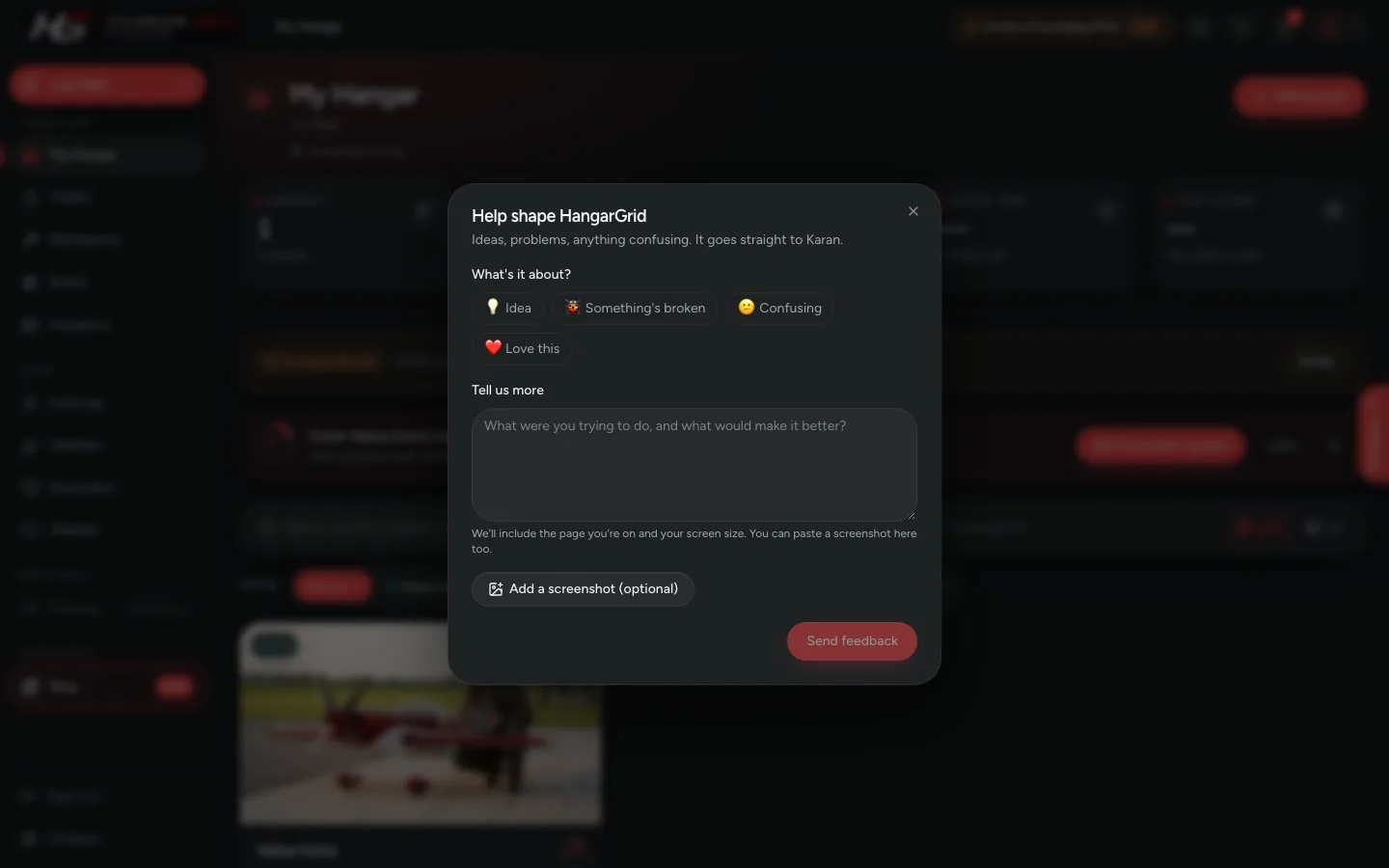
On the right edge of every page there's a Feedback tab. Use it any time, for anything. Every message comes straight to me, and I read every one.
The Feedback tab, on every page. Anything you send comes straight to me.
The most useful feedback is specific and honest. For example:
"I couldn't work out where to record a battery's cycles."
"Adding my aircraft asked for things I didn't know, so I gave up halfway."
"The weather said it was a good day, but the gusts at my field were terrible."
"I fly glow engines, and there's nowhere to note my plug and needle settings."
"I loved the safety status. It made me fix a servo I'd been ignoring."
Don't worry about whether something is "too small" or "probably just me". The small annoyances are exactly the things I can't see myself, and if it happened to you, it'll happen to the next pilot too.
Quick answers
Does HangarGrid cost anything? No. HangarGrid doesn't charge pilots, and that won't change.
I already have a HangarGrid account. Can I still be a Founding Pilot? Invite links are for new accounts. If you joined before the program started, message me and I'll add you myself while spots remain.
What if all 50 spots are taken before I finish? Your hangar, aircraft and flights are all yours and stay exactly as they are. You just won't have a Founding Pilot number.
What can the pilot who invited me see? Your name, and whether you've added an aircraft with a photo and logged a flight. Nothing else about your hangar. Your aircraft and their history stay private unless you choose to share them.
Can I invite more than three? As a Founding Pilot, three is the limit. You can always invite more pilots to HangarGrid itself; they just won't earn a Founding spot through you.
Thank you
If you're reading this because I sent you the link: thank you. I asked you because I trust your judgement and I value how you fly.
If you're reading it because a fellow pilot sent it: welcome. They've vouched for you, and that means a lot to me.
The first 50 will shape what HangarGrid becomes for every pilot who comes after us. I'm genuinely excited to build it with you.
See you at the field. Blue skies and soft landings.